It was three in the morning, and the hotfix should have been easy. A customer's sign-up had been recorded wrong, and the clean repair was to replay a single row into our audit table — a table with 47 columns. The script was already written. I just had to change one value: the new_value in column 31. So I started counting commas. I lost my place at a comma inside a JSON string. I scrolled up to the column list, counted down, scrolled back, made the edit, ran the statement — and wrote to the wrong field.
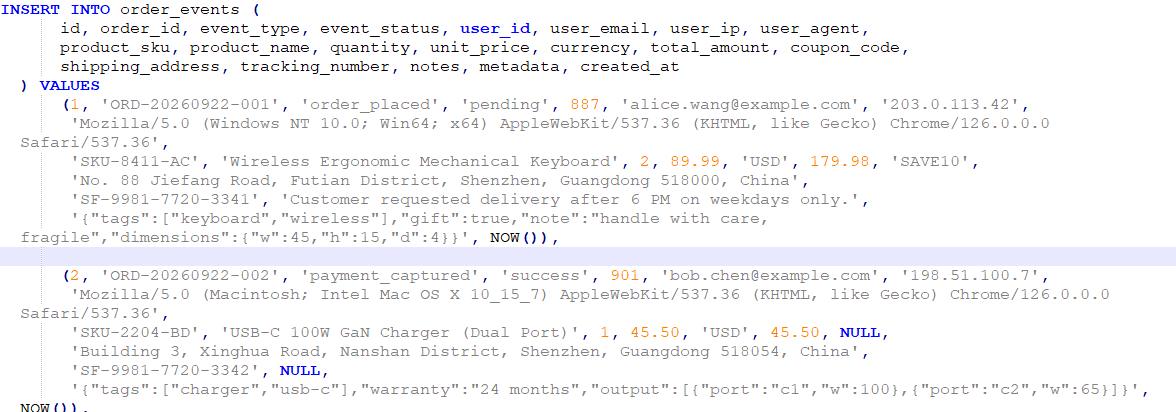
I'd been beaten again by the way SQL lays out an INSERT. Column names sit in one list, values sit in another, and nothing connects them except position. The moment a value contains a comma, a bracket, or a function call, counting falls apart. This is the story of how I finally stopped counting — and the small browser tool I built to make sure I never have to again.
Why INSERTs are hard to edit
Most SQL is forgiving to read because the clauses carry meaning. A WHERE user_id = 42 tells you exactly what it filters, because the column name and the value sit next to each other. An INSERT is different. Its two lists are parallel arrays:
INSERT INTO audit_log (
    id, user_id, action, entity_type, entity_id, old_value, new_value, created_at
) VALUES (
    1, 887, 'update', 'email', 99213, 'a@old.com', 'b@new.com', NOW()
);
The database matches entity_type to 'update' only because they're both third in line. Your brain has to do the same positional matching — and it's bad at it. Now add the realities of production SQL: a value that's a JSON blob full of commas, an inline CASE, a NOW(), a string that contains a closing parenthesis. Every one of those is a trap for the comma-counter.
It gets worse with a multi-row insert, where you're tracking position across several VALUES tuples at once:
INSERT INTO audit_log (id, user_id, action, entity_type, entity_id, old_value, new_value, created_at)
VALUES
    (1, 887, 'update', 'email', 99213, 'a@old.com', 'b@new.com', NOW()),
    (2, 901, 'update', 'email', 99214, 'c@old.com', 'd@new.com', NOW()),
    (3, 902, 'create', 'order', 99215, NULL, '{"line_items":[{"sku":"A1","qty":2}]}', NOW());
How the Insert Editor works
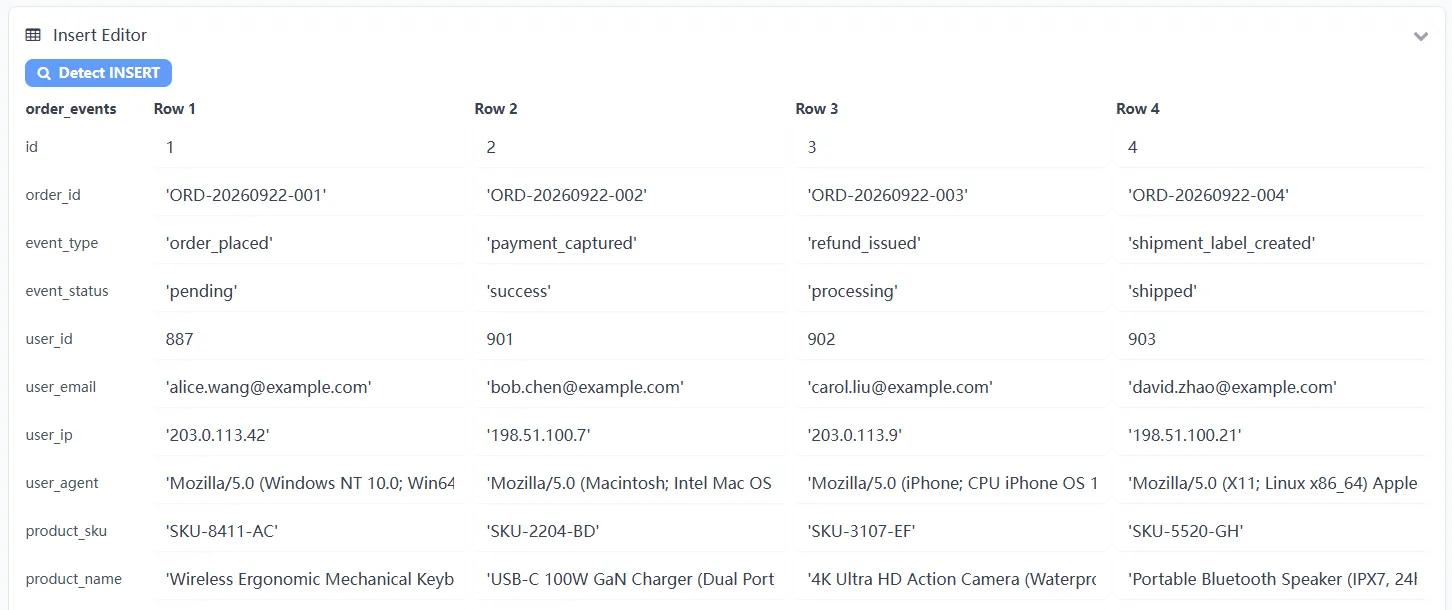
The fix is to stop treating an INSERT as two lists and start treating it as a mapping — column name to value. That's what the Insert Editor in our SQL Formatter does. Paste an INSERT, click Detect INSERT, and it parses the statement into its column list and value rows, then lays them out as a grid:
- Every row is a column — the field name sits on the left, and its value input sits right beside it. No more counting.
- Multi-row INSERTs get their own columns — each
VALUEStuple becomes a column, so a 3-row insert shows as three editable value columns. - Values are shown verbatim — strings keep their quotes,
NULLstaysNULL, and expressions likeNOW()appear exactly as they were written, so nothing gets mangled. - Edits write back automatically — change a value and the tool rebuilds a correct
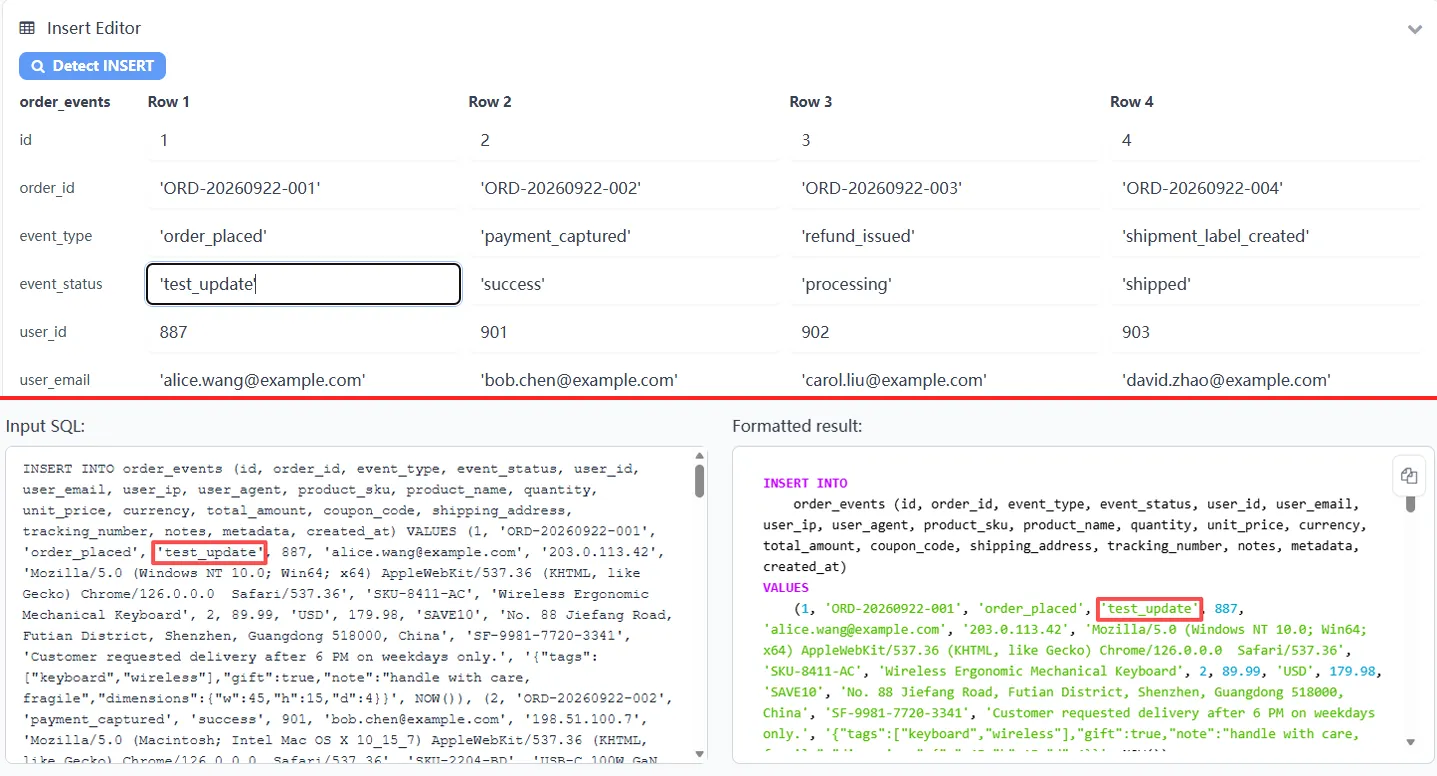
INSERTand reformats it, so the result stays in sync with what you typed.
A real example
Let me use the exact situation that started this: changing one value inside a long insert. Here's a trimmed version of the audit-row statement — the field I need to fix is new_value, near the middle:
INSERT INTO audit_log (id, user_id, action, entity_type, entity_id, old_value, new_value, created_at)
VALUES (1, 887, 'update', 'email', 99213, 'a@old.com', 'b@WRONG.com', NOW());
Before, I'd have to count seven fields into the VALUES list and hope I'd landed on new_value and not entity_type. With the Insert Editor, I paste it, detect it, and change the b@WRONG.com field directly in the row labeled new_value. The rebuilt statement comes out correct:
INSERT INTO
    audit_log (id, user_id, action, entity_type, entity_id, old_value, new_value, created_at)
VALUES
    (1, 887, 'update', 'email', 99213, 'a@old.com', 'b@new.com', NOW());
No counting, no scroll-up-and-back, no "which column was that again?" — the field name is right there next to the value I'm editing. What used to take a minute of anxious counting now takes a couple of seconds.
When the Insert Editor can't help
I want to be honest about the one place this approach stops working. Some inserts omit the column list entirely:
INSERT INTO audit_log VALUES (1, 887, 'update', 'email', 99213, 'a@old.com', 'b@new.com', NOW());
This form is valid SQL, but it's only meaningful because the values happen to match the table's column order — information that lives in the table definition, not in the statement. A browser-based tool can't see your schema, so it can't name the columns. If you're in this situation, the fix is simple and worth doing anyway: write out the explicit column list. It makes the statement self-documenting, and it unlocks the editor. Most of the inserts worth editing by hand already have it.
Why it runs entirely in your browser
An INSERT is rarely harmless. It usually carries table names, column names, and the exact shape of your production data — sometimes real customer values. That's not the kind of thing you want passing through a third-party server. The Insert Editor parses and rebuilds everything locally: your SQL never leaves your device, never gets logged, and never touches a remote database. Paste real rows with real data; it stays private.
Frequently asked questions
What does the Insert Editor do?
It parses an INSERT statement and shows each value next to its column name in an editable grid. You change values in the grid, and it rebuilds a correct INSERT for you — no comma-counting or positional matching.
Why is it hard to match values to fields in a long INSERT?
INSERT lists column names and values as two separate lists that only line up by position. When a value contains a comma, a bracket, a quoted string, or a function call, it's easy to lose your place and edit the wrong field.
Does it work with multi-row INSERTs?
Yes. When an INSERT has multiple VALUES tuples, each row of values becomes its own column in the grid, so you can edit any value in any row.
What if my INSERT doesn't list the columns?
An INSERT without a column list relies on the table's column order, which a browser-based tool can't know. Add the explicit column list and the editor can map every value to a field.
Is my SQL data safe when I use the Insert Editor?
Yes — parsing and editing run 100% in your browser, so your SQL never leaves your device.
Still fighting messy SQL in general? Start with How to Format SQL and Replace Parameter Placeholders, or learn to pull values out of nested structures with How to Query JSON with JSONPath.
Ready to stop counting columns?
Open the free, in-browser SQL Formatter, paste your INSERT, and let the Insert Editor label every value for you — nothing uploaded.
Try the Insert Editor